Systems programming course, 2024
TFTP File Server
A multi-client file server and console client in Java that speak a binary protocol over TCP. Clients log in, upload, download and delete files, and every logged-in client hears about each change as it happens.
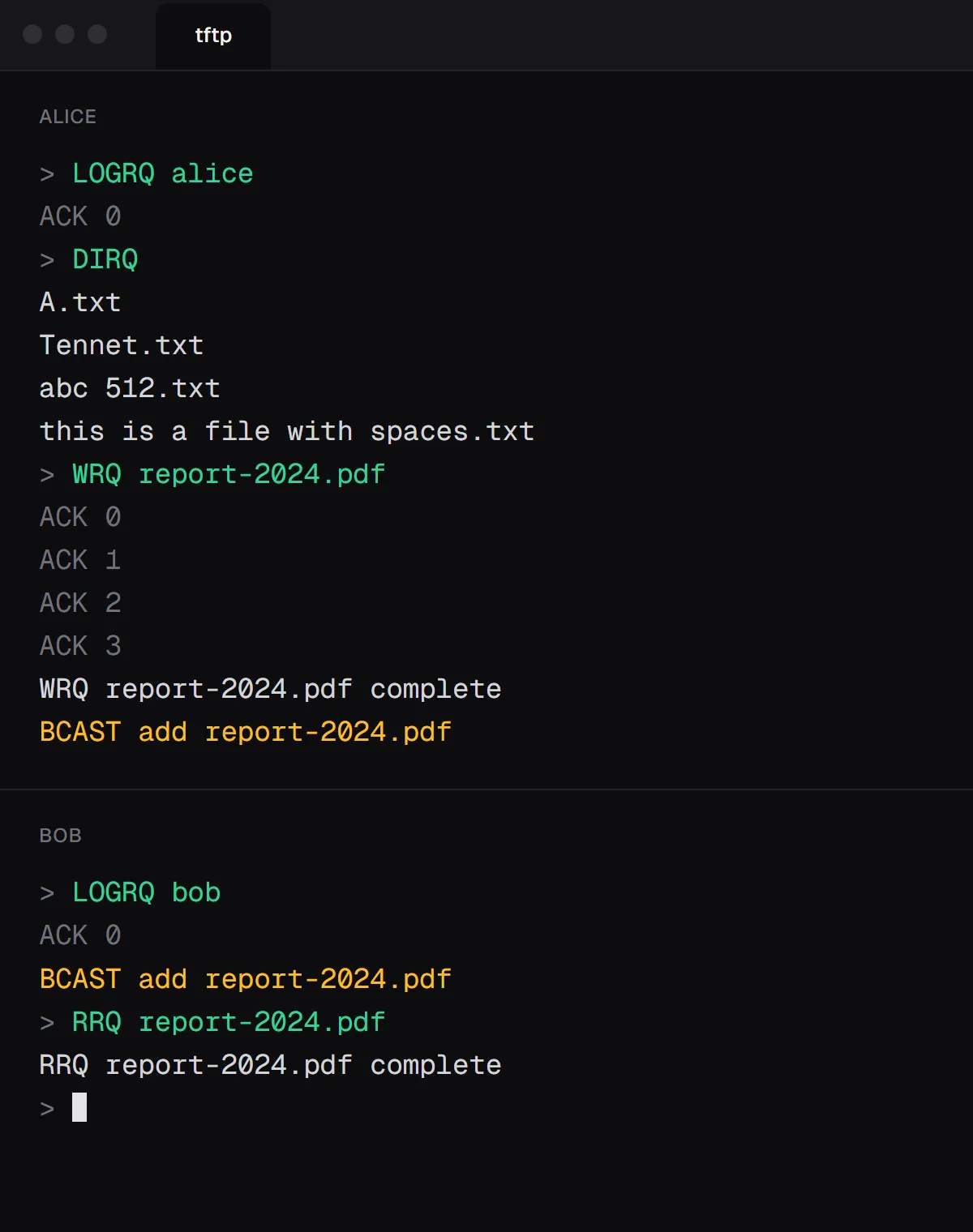
- A thread per client on the server, and two threads on the client so broadcasts can arrive while you type.
- Logins and uploads are claimed atomically, so two clients can never win the same name, and nobody sees half a file.
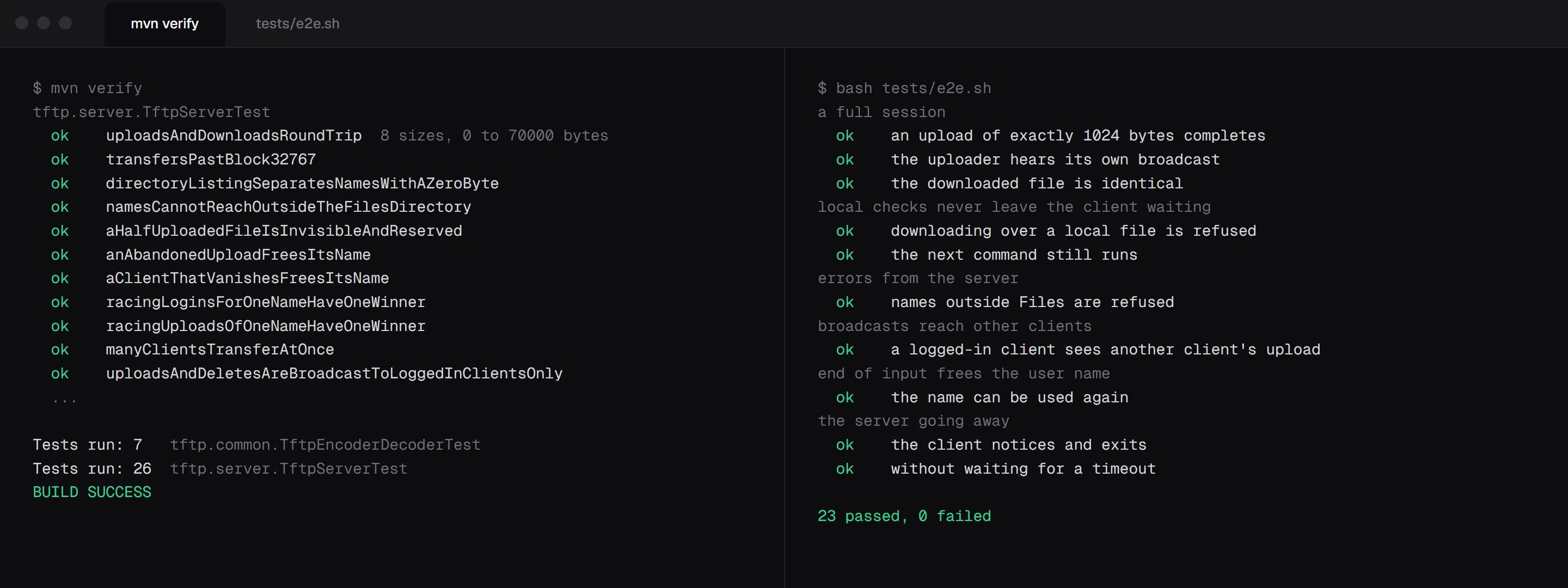
- 33 JUnit tests over real sockets, including 20 clients racing for one name, plus 23 end-to-end checks in CI.
What it is
A file server and a client that talk an extended version of TFTP, a small binary protocol, over TCP. A client logs in with a user name and can then list, download, upload and delete files in the server’s folder. Whenever a file is added or deleted, the server tells every logged-in client.
I built it with a partner in 2024 for the Systems Programming course at Ben-Gurion University, and later added a test suite that drives it over real sockets.
The protocol
Every packet starts with a two-byte opcode. A request names its file in a string that ends with a zero byte. Files travel in blocks of up to 512 bytes, and each block waits for an ACK with its number before the next one goes out. A block shorter than 512 bytes ends the transfer, so a file whose size is an exact multiple of 512 ends with an empty block. That rule comes up again below.
TCP delivers a stream of bytes with no message boundaries, so the decoder reads one byte at a time and lets the opcode decide where a packet ends. Request packets end at a zero byte, DATA ends after the size it declares (its contents may contain zeros), and ACK always has four bytes. The server and the client share this one decoder.
How it’s built
One thread per client. The server accepts a connection and gives it a thread, its own decoder and its own protocol object. The protocol doesn’t return replies. It sends through a shared map of connections, so it can answer its own client and also broadcast to everyone else. A broadcast is written on the sender’s thread, so each connection’s send is synchronized.
Claims are atomic. Logged-in names live in a concurrent map, and logging in is a single putIfAbsent. If two clients ask for the same name at the same instant, exactly one gets it. An upload reserves its file name the same way, collects the blocks in memory and creates the file only when the last block arrives. Other clients never see a half-written file, and a second upload of the same name is turned away. When a client leaves, or just drops its connection, its name and any unfinished upload are released.
Two threads on the client. The server can send at any moment, because a broadcast about someone else’s upload isn’t a reply to anything. So one thread reads the keyboard and the other reads the socket. The keyboard thread sends a request and waits until the listening thread says the operation is over.
Getting the details right
Each of these is a case the code handles on purpose, and each one has a test.
Wait for a condition, not a message. The keyboard thread has to wait until the current operation is over, not just until some message arrives. During an upload the first ACK isn’t the end, a reply can arrive before the thread starts waiting, and a command refused locally sends nothing at all. So it waits in a loop on a pending flag that only the end of an operation clears, under the same lock. It’s the textbook pattern, and the only one that handles all three cases.
The empty last block. A file whose size is an exact multiple of 512 bytes has to end with an empty block, or the other side can’t tell the transfer is over. The client and the server split files into blocks with the same rule, so a 1,024-byte upload arrives whole.
A zero byte, not a '0'. The directory listing separates names with a zero byte. With the character '0' instead, report-2024.txt would come back as two files, and a test checks a name just like it.
Names stay inside the folder. Every file name is resolved and checked to stay inside the server’s folder, so a request for ../server.log is refused instead of reaching a file the server never meant to share.
Claim in one step. Checking whether a name is free and taking it happen in a single atomic step, and a client that drops without saying goodbye has its name released.
Testing
The server tests open real sockets and send raw packets, so they check exactly what the server writes back. They include:
- uploads and downloads of 0, 1, 511, 512, 513, 1,024, 1,537 and 70,000 bytes, plus a 17 MB download that goes past block 32,767, where a signed 16-bit counter would go negative
- 20 clients logging in with the same name at the same instant, and 20 uploading the same file name. Exactly one wins each time.
- a file that isn’t visible to other clients until its last block arrives, and a dropped upload that frees its name
- names like
../secret.txt,..\secret.txtand..refused for every request type
A shell script then runs the real client against the real server. It checks a full session, commands that are refused locally and must not leave the client waiting, a second client that has to hear the first one’s upload, and a server that dies mid-session. GitHub Actions runs everything on every push.